$29one-time
Unlimited use, for life
Nothing to renew or cancel
One active session per user
Sign in with Google
Future updates at no cost
Play your guitar, get MIDI. Live or from a recording, notes and chords land in your DAW as standard MIDI. Any guitar, any pickup – nothing to install on the instrument.
musictomidi.com converts your recordings online. Guitar to MIDI is the desktop version built for guitarists: it runs on your machine, tracks your playing as you play, and drops straight into your DAW.
Windows · standalone & VST3
Move the slider to hear the original guitar fade into the MIDI instrument.
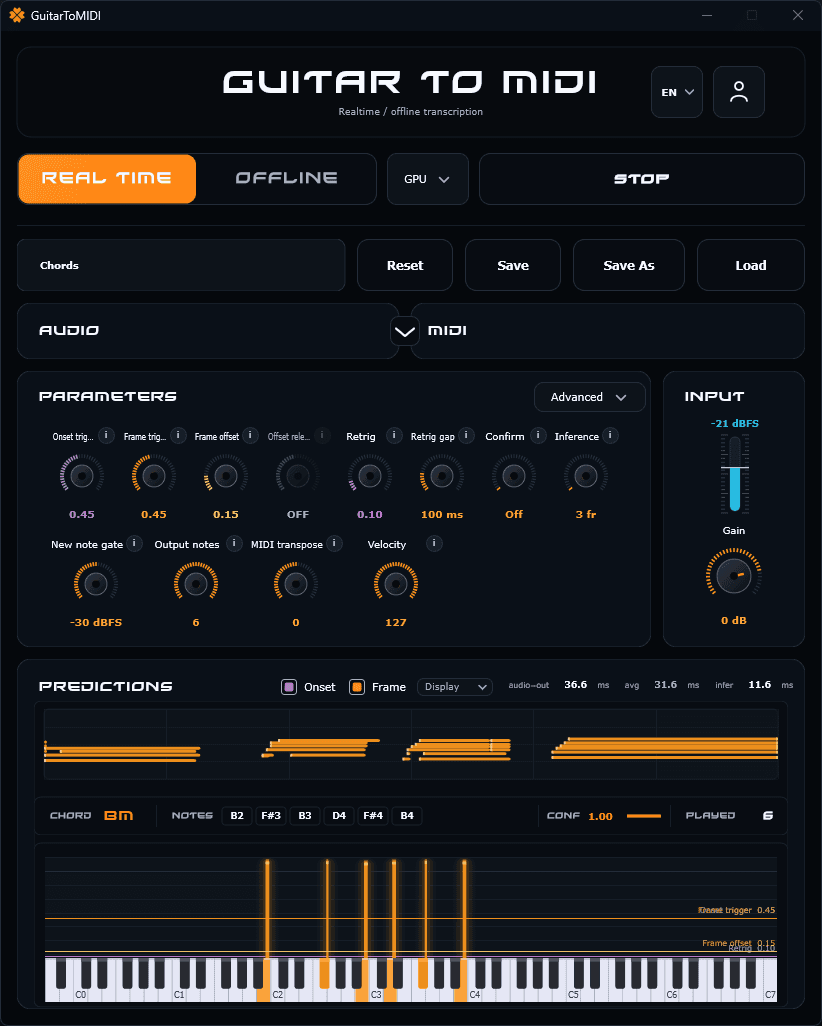
One switch takes you from playing live to converting recorded files.
Onset, gate, sanitizer and hold let you shape the tracking around your technique, not the other way round.
Save a profile for chords, another for single-note lines, and recall whichever fits.
Run it on its own or load it in your DAW. The output is plain MIDI, readable by any soft synth or hardware module.
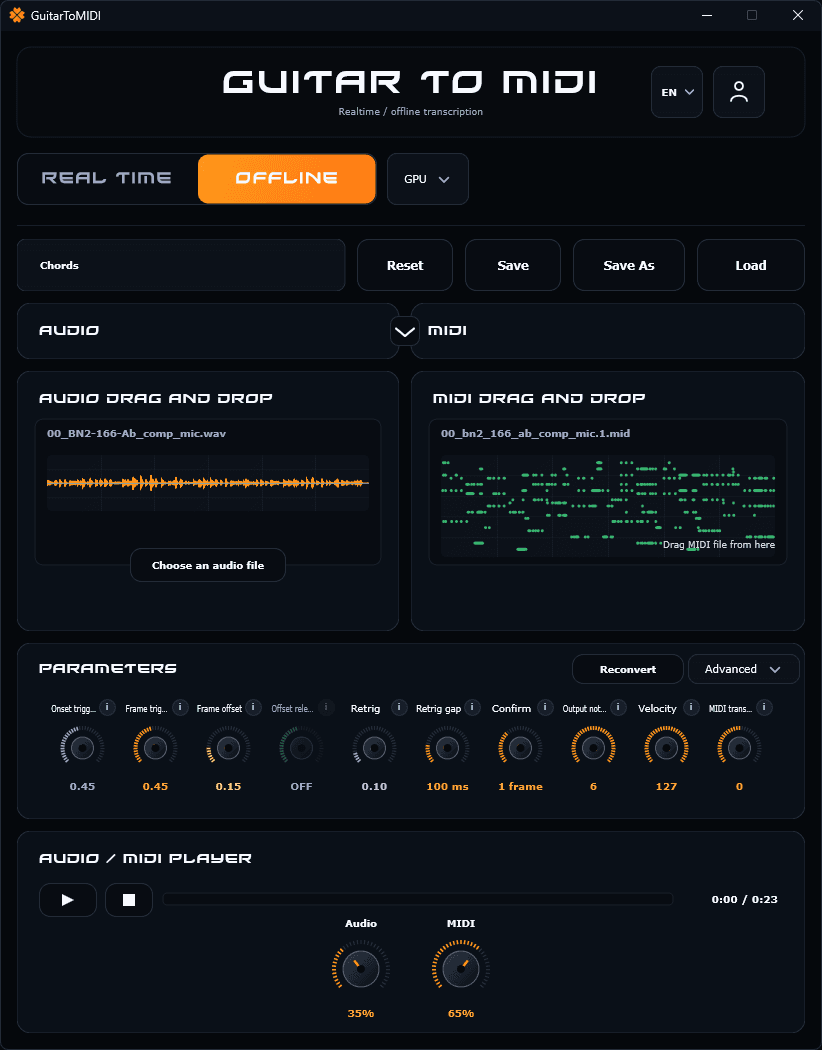
Drag an audio file onto the app and the model turns it into MIDI — no need to play the part again.
The resulting file appears in the side panel; drag it onto your DAW timeline.
Listen to the original and the MIDI version together, with a blend control between them.
Onset, retrigger, velocity and transpose behave exactly like in real-time mode.
A lifetime license, no subscription. One payment and the app is yours, updates included.
Features in development, covered by the license at no extra charge.
A Mac build, standalone and AU plugin.
Load a VST instrument inside the app so it plays the MIDI directly.
A dedicated model that reads how hard you pick and maps it to note velocity, live. Already testable in beta in the app.
Your guitar makes sound: an analog audio signal, a waveform full of harmonics and transients. MIDI is not sound. It’s a list of events – which note, when it starts, when it stops, how hard it was played (velocity). Turn a guitar performance into MIDI and your guitar becomes a MIDI controller, like a MIDI keyboard: the same phrase can be played back by any virtual instrument or synthesizer – a piano, a sax, an organ, synths, a drum machine, or a hardware module. You can also edit the notes, fix a wrong one, change the key, or drop the part into a notation program. The demos at the top of this page are exactly that: a guitar line, turned into MIDI, voiced by another instrument – a guitar midi conversion rather than a recording of the guitar sounds.
A MIDI pickup and a hardware converter. A hexaphonic pickup (one sensor per string) mounted on the guitar, wired to a converter box or a wireless unit, which outputs MIDI. This is the classic route – Roland’s GK system, Fishman TriplePlay and similar. It tracks each string separately, but it means installing extra hardware on every guitar you want to use, and buying the converter.
A monophonic guitar-to-MIDI pedal. A pedal that listens to the guitar’s normal output and turns it into MIDI, one note at a time. Nothing to install on the guitar, but single-note lines only – no chords.
Software on the guitar audio. The guitar signal goes into an audio interface like it would for recording, and a program on the computer does the audio to midi conversion – it converts guitar to midi from the signal alone, with no setup on the instrument – live, or from an audio track you already recorded. Any guitar, acoustic or electric, any pickup, nothing on the instrument. That’s what Guitar to MIDI does, as a standalone Windows app or a VST3 plugin inside your DAW workflow. It’s polyphonic: strum a chord and the notes come out as MIDI, which no monophonic pedal can do and which is normally the reason people buy a hexaphonic pickup.
Live, the app listens to your interface’s input and turns your guitar playing into MIDI as you play, with the velocity of each note. You hear the result straight away on the app’s built-in instruments – piano, sax, organ, synth – or send the MIDI to your DAW, a soft synth or a MIDI keyboard’s sound module, which receive it like they would from any MIDI controller. Latency depends on your audio driver and buffer size – see “How do I get the lowest latency?” in the FAQ below.
From a recording, you drop an audio file onto the app and it turns the whole guitar part into a .mid file, which you drag onto your DAW timeline. Same detection, same controls and presets – useful when the part is already recorded and you don’t want to play it again.
Download is immediate. Your 30-minute session starts the first time you sign in inside the app, not when you download.
No. Download, sign in, play. Buying the license is a separate step, afterwards.
Windows only for now, macOS is in development. The license allows one active session per user.
Use an ASIO driver: your interface's own, or ASIO4ALL / FlexASIO if it doesn't ship one. WASAPI and DirectSound add noticeable delay live. Then lower the buffer size until just before it crackles.
Yes. Recordings, releases, gigs, client work: all covered by the license.
None. Single payment, nothing recurring, nothing to cancel.
Google sign-in, no card required.
You can also download the app on guitartomidi.com.
Install on Windows